
Building and distributing single-architecture Docker images efficiently and reliably across diverse computing environments presents a significant challenge. Additionally, managing the complexity of building and pushing multiple images for different architectures can be time-consuming and error-prone.
For instance, imagine a scenario where a customer initially uses an x64 (Windows) based operating system to run containerized applications. Over time, their requirements evolve, and they transition to AMD64 (Linux) and eventually ARM64 (Linux).
Each change in the operating system necessitates rebuilding Docker images for the new architecture, updating Docker Hub tags, and maintaining compatibility. This adds considerable effort and introduces room for human error.
The Solution: Docker BuildX
Docker BuildX offers a robust solution to this problem. It is a Docker CLI plugin that extends standard Docker commands, providing comprehensive support for multi-platform builds. Introduced in Docker Engine 19.00 and included with Docker Desktop, BuildX enables developers to:
Build Multi-Platform Images Simultaneously: With BuildX, you can create Docker images compatible with multiple architectures (e.g., x64, AMD64, ARM64) in a single build process. This eliminates the need to manage separate builds for each platform.
Simplify Tag Management: By unifying the build process, you can maintain consistent tags across platforms, reducing administrative overhead.
Key Features of Docker BuildX
- Multi-Platform Builds: Build images for different architectures (Linux and Windows) in one step.
- Advanced Caching: Speeds up the build process by leveraging caching mechanisms.
- Integration with Docker Desktop: Pre-installed and ready to use, making setup hassle-free.
Example: Multi-Arch Alpine Image with Git
Consider the “alpine” skeleton image that supports multi-architecture, available on Docker Hub. To confirm its multi-arch support, you can run the docker manifest inspect command.

To customize this image by adding Git, use the following Dockerfile:
FROM alpine
RUN apk update
RUN apk add git
This Dockerfile starts with the lightweight “alpine” base image, updates the package index, and installs Git, resulting in a customized image.
Fetching Architecture Information of Docker Images
After building the Docker image, you can fetch detailed information about its architecture using traditional Docker commands. For example:
To check container configurations for a running container, use the docker inspect command: docker inspect <image-name>. This command provides comprehensive details about the image, such as its architecture, environment variables, network settings, and more.

The above images shows that the architecture the newly created docker image supports as “amd64”. This means the current image that is built with traditional docker command will only support “amd64” architecture and will fail for other architectures.
Multi-Arch: The Old Way
To create an image that should run on all architectures of Linux, developers traditionally had to write four different Dockerfiles, each tagged with --platform=arm64. This approach required significant manual effort and increased the likelihood of errors, making it inefficient for scaling across multiple architectures.
Additionally, developers needed to maintain four separate images in the registry based on processors and their architectures. This setup became cumbersome, especially when updates were required, as every individual image had to be rebuilt and retagged, increasing maintenance overhead.
Multi-Arch: BuildX Way
Instead of building using the traditional docker build command, use docker buildx build for multi-platform support. For example:
docker buildx build –rm –push –platform linux/amd64,linux/arm64,linux/arm -t /samplealpine:v1 .
In this command:
--rm: Removes intermediate containers after a successful build.--push: Pushes the built image to the specified registry.--platform: Specifies the target platforms for the image build.-t: Tags the image for easier reference.
By passing the --platform argument, you can ensure the image is built for all specified architectures in a single command.
Pulling and Inspecting Multi-Arch Images
After pushing the multi-arch image, you can pull the image for a specified platform using the following command:
IMAGE=<your-namespace-name>/sample:v1
docker pull –platform linux/amd64 $IMAGE
To verify the architecture of the pulled image, use the docker inspect command. For example:
docker inspect $IMAGE | grep Architecture
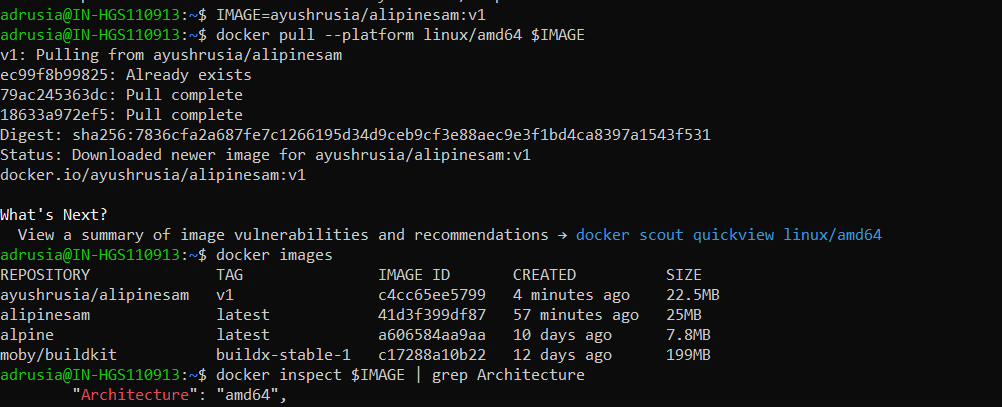
This confirms the architecture of the image pulled for the specified platform.
More images pulled with platform specified in the command:
1. With arm64 –
IMAGE=<your-namespace-name>/sample:v1
docker pull –platform linux/arm64 $IMAGE
docker inspect $IMAGE | grep Architecture

2. With arm –
IMAGE=<your-namespace-name>/sample:v1
docker pull –platform linux/arm $IMAGE
docker inspect $IMAGE | grep Architecture

Conclusion
Docker BuildX transforms how developers approach building and distributing Docker images. Its ability to streamline multi-platform builds and simplify tag management makes it an invaluable tool for organizations working with diverse computing environments. While there are challenges, such as increased image size, leveraging multi-stage builds can help minimize this downside effectively.
By adopting Docker BuildX, you can future-proof your development pipeline, ensuring a seamless transition between architectures without compromising on efficiency or reliability.

 THE NUCLEAR GEEKS