When I started learning Kubernetes, I was confused about:
- What is RBAC?
- Why does
kubectl get podswork? - Why does the same thing fail inside a pod?
After doing a hands-on lab on Killercoda, everything finally made sense.
This article explains RBAC in plain English, using the exact example I ran.
First: Everything in Kubernetes goes through the API
In Kubernetes:
- Creating pods
- Listing pods
- Reading secrets
Everything goes through the Kubernetes API
Even kubectl is just a tool that talks to this API.
Step 0: Start a Kubernetes cluster (Killercoda)
I used Killercoda Kubernetes Playground. Once the terminal opened, I verified the cluster:
kubectl get nodes
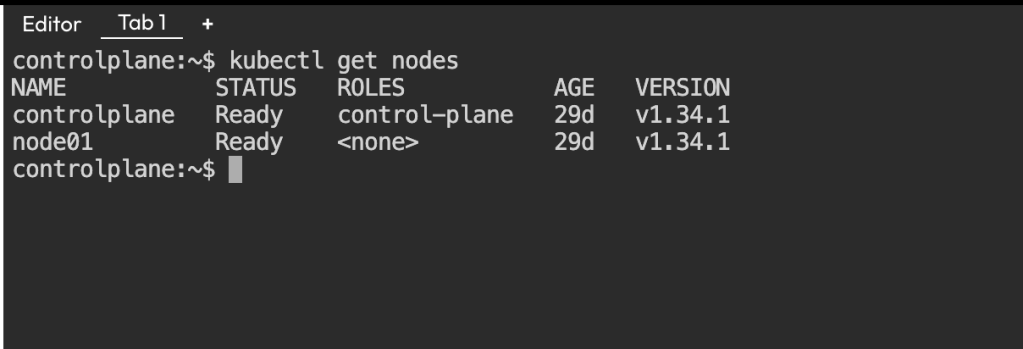
So above command confirms that cluster is up and running.
Step 1: Create a simple Pod (NO RBAC yet)
First, I created a very simple pod that does nothing except stay alive.
# pod.yaml
apiVersion: v1
kind: Pod
metadata:
  name: test-app
spec:
  containers:
  - name: app
    image: curlimages/curl
    command: ["sleep", "3600"]
kubectl apply -f pod.yaml
kubectl get pod test-app
Step 2: Kubernetes automatically assigns a Service Account
I did not specify any Service Account in the pod YAML, So Kubernetes automatically assigned the default service account.
I verified it:
kubectl get pod test-app -o yaml | grep serviceAccount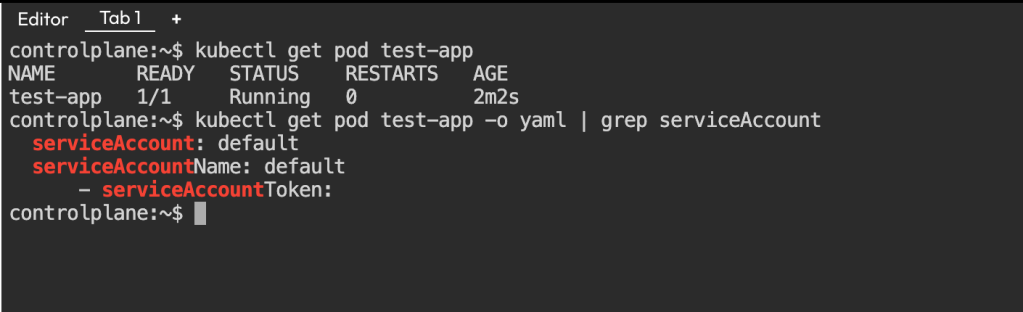
Step 3: Enter the Pod
Now I went inside the pod and Inside the pod, I tried to list pods using Kubernetes API.
kubectl exec -it test-app -- sh


TOKEN=$(cat /var/run/secrets/kubernetes.io/serviceaccount/token)

curl -k \
  -H "Authorization: Bearer $TOKEN" \
  https://kubernetes.default.svc/api/v1/namespaces/default/pods
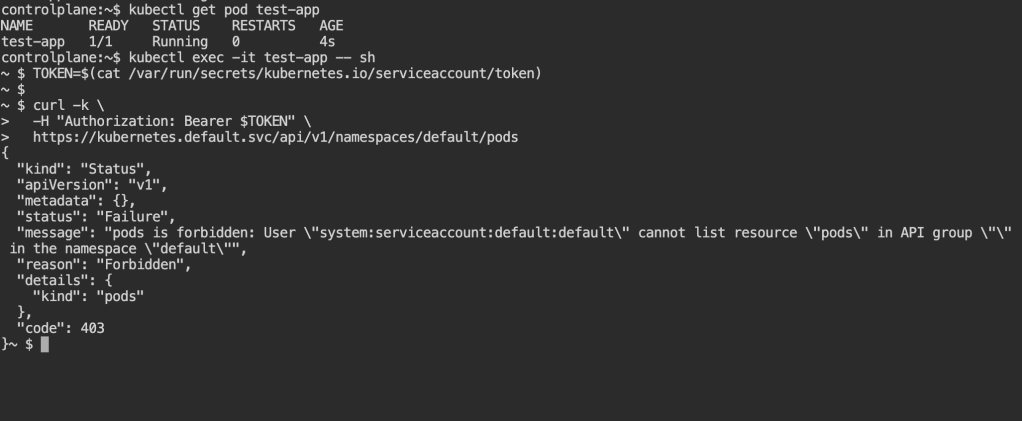
Now it shows Forbidden error. This is RBAC blocking access. It failed because:
- The pod had an identity (Service Account)
- But had no permission
This is exactly what RBAC controls.
Step 4: Create a Service Account (WHO)
Now I created a dedicated Service Account:
kubectl create serviceaccount pod-reader-saStep 5: Create a Role (WHAT is allowed)
Next, I created a Role that allows reading pods.
# role.yaml
apiVersion: rbac.authorization.k8s.io/v1
kind: Role
metadata:
  name: pod-reader-role
rules:
- apiGroups: [""]
  resources: ["pods"]
  verbs: ["get", "list"]
kubectl apply -f role.yaml
Step 6: Bind Role to Service Account (RBAC magic)
Now I connected: Service Account -> Role
# rolebinding.yaml
apiVersion: rbac.authorization.k8s.io/v1
kind: RoleBinding
metadata:
  name: pod-reader-binding
subjects:
- kind: ServiceAccount
  name: pod-reader-sa
roleRef:
  kind: Role
  name: pod-reader-role
  apiGroup: rbac.authorization.k8s.io
kubectl apply -f rolebinding.yamlStep 7: Recreate Pod using new Service Account
I deleted the old pod and recreated it using the new Service Account.
# pod.yaml (updated)
apiVersion: v1
kind: Pod
metadata:
  name: test-app
spec:
  serviceAccountName: pod-reader-sa
  containers:
  - name: app
    image: curlimages/curl
    command: ["sleep", "3600"]
kubectl delete pod test-app
kubectl apply -f pod.yaml
kubectl get pod test-app
Step 8: Try again from inside the Pod (SUCCESS )
Enter pod and Run API call again:
kubectl exec -it test-app -- shTOKEN=$(cat /var/run/secrets/kubernetes.io/serviceaccount/token)
curl -k \
-H "Authorization: Bearer $TOKEN" \
https://kubernetes.default.svc/api/v1/namespaces/default/pods
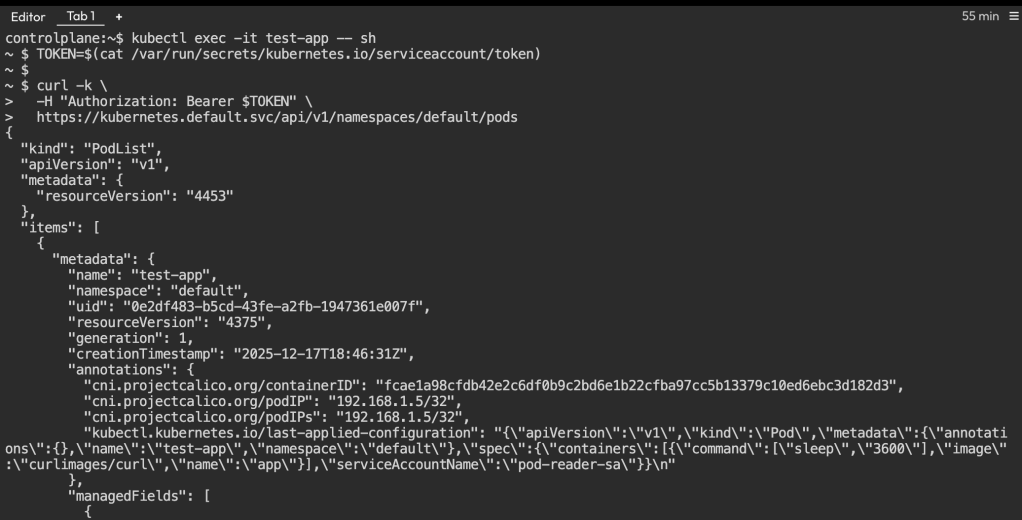
This time, it worked and returned the list of pods.
RBAC – The full permission system
Service Account – WHO the pod is
Role – WHAT the pod can do
RoleBinding – Gives WHAT to WHO
If this post helped you understand RBAC even a little better, try running the same commands yourself -that’s when it really sticks.

 THE NUCLEAR GEEKS