
Ever wanted to transform a video lecture into readable text ? This guide will help you understand video text extraction using Python libraries. We’ll explore how to extract spoken words from videos by converting them to audio, utilizing speech recognition techniques, and finally, presenting the extracted text in a usable format.
Overview:
- Install and import necessary libraries.
- Extract audio track from the video file
- Extract text from audio file
- Save the text in
.txtfile
!pip -q install SpeechRecognition
import speech_recognition as sr
import moviepy.editor as mp

from google.colab import files
uploaded = files.upload()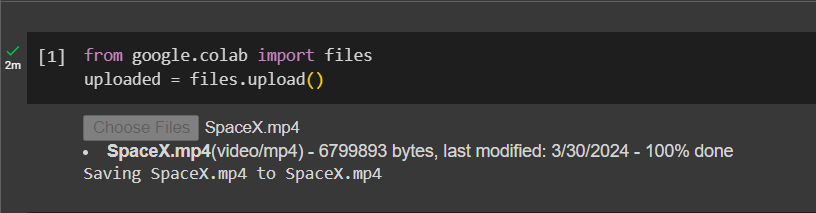
Great ! Now we have our libraries and video all set up. Next we will extract the audio from the text and save it to file named ‘converted.wav‘
clip = mp.VideoFileClip(r"/content/SpaceX.mp4")
##replace the video path with your own
clip.audio.write_audiofile(r"converted.wav")

r = sr.Recognizer()
audio = sr.AudioFile("converted.wav")
With our audio file ready, we are all set to extract the text and save it to a string variable result
with audio as source:
  audio_file = r.record(source)
result = r.recognize_google(audio_file)
Using file method, we will write the text to our extracted_text.txt
with open('extracted_text.txt',mode='w') as file:
  file.write("Extracted text is :")
  file.write("\n")
  file.write(result)
  print("Text extracted and saved to: extracted_text.txt")
  print("ready!")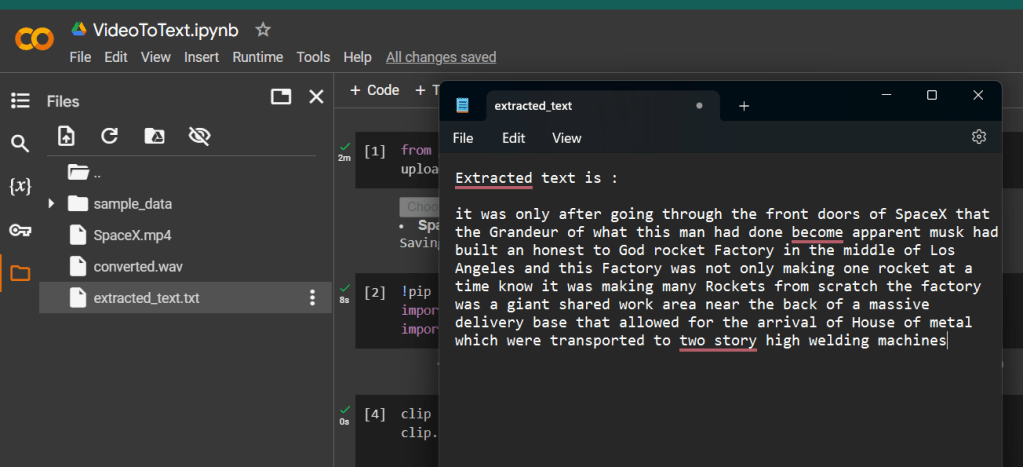
From installing libraries to organizing the extracted text, you can now unlock the valuable information that is hidden within your video files.
But that’s not it ! After receiving the text, you will need to organize it into proper sentences and paragraphs, and correct any grammatical errors to make it more readable. I will cover that in the next blog since till then stay tuned.
Thank you for reading !!

 THE NUCLEAR GEEKS